

Switch to Modern Web Client
You can access your Zimbra email many different ways using your favorite email clients. You can always access your email by going to https://zimbra.voonami.com.
Choose to use the Modern Web Client.
- From the classic UI navigate to the Preferences pane on the top of the page.
- Navigate to the General Settings tab on the left of the page.
- In the General Settings Page under the Sign In section select Modern or Classic.
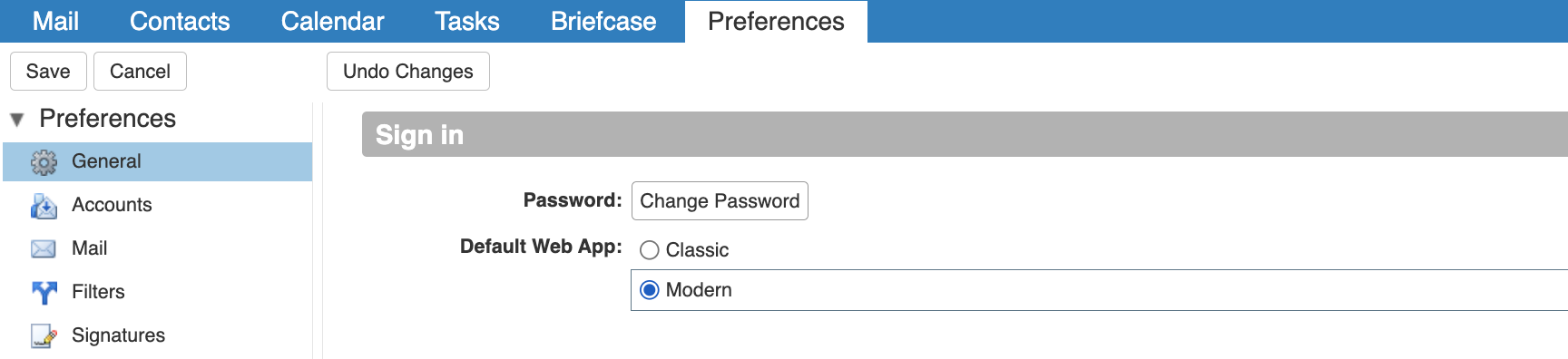
- Save Changes by clicking save on the left side of the page.
- Log out, and log back in, or switch to the Modern Web Client temporarily.
Switch to the Modern Web Client temporarily.
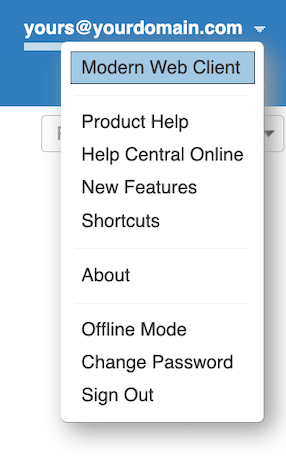
- From the Classic UI, the modern view can be chosen.
- On the top right side of the page click the user's name to reveal a dropdown.
- Within the dropdown select "Modern Web Client"
Switch back to the Classic Web Client.
- Within the URL bar, remove /modern/ from https://zimbra.voonami.com/modern/
- If you have Chosen to use the Modern Web from preferences, email support@voonami.com.